Audience:
Glossary
Swan data model
The Swan data model depicts the relationship between key elements that make up Swan.
1→ exactly one of that element per user0..1→ between zero and one of that element per usern→ an unlimited number of that element per user
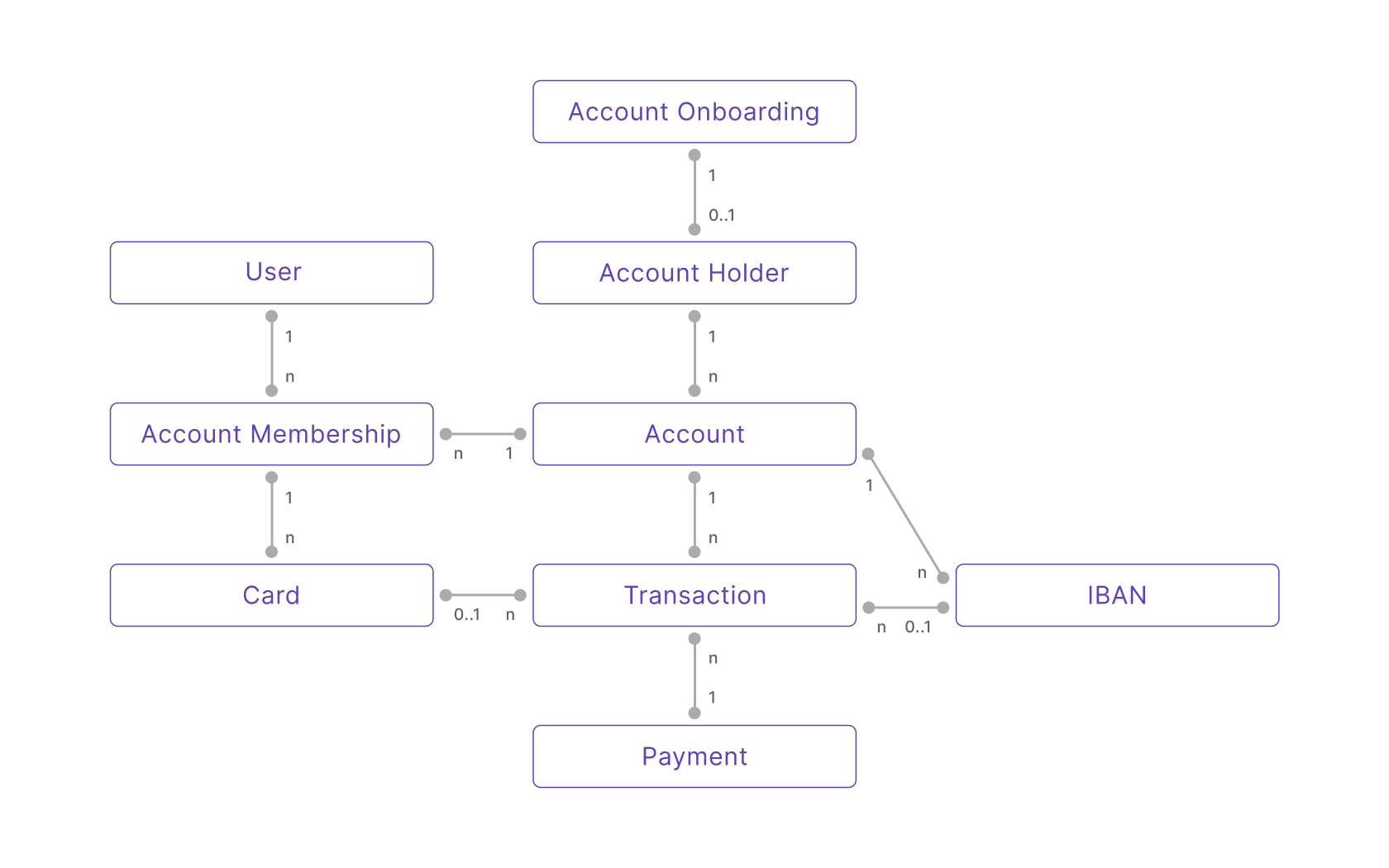
Text description of data model
- To open a Swan Account, your end user completes one Account Onboarding form.
- Before finalizing their Account Onboarding, your end user needs to sign up as a Swan User.
- After the Account Onboarding is finalized, an Account Holder is created.
- A first Account is created for your user (who is now an Account Holder).
- The first Account Membership to that account is created for the Account Holder, which represents their membership permissions for that Account.
- One Account Holder owns one or more Accounts.
- One Account invites one or more Account Memberships.
- One User is invited to accept one or more Account Memberships to different Accounts.
- One Account Membership issues as many Cards as required.
- One Account owns one or more IBANs. The first is the main IBAN, and all others are virtual.
- One Account can execute unlimited Transactions with Cards or IBANs.
- One Payment contains one or more Transactions.
Account onboarding
Company account onboarding
Process of creating a new company account holder, and opening a new Swan account for that account holder.
Individual account onboarding
Process of creating a new individual account holder, and opening a new Swan account for that account holder.
Know Your Customer (KYC)
Know Your Customer (KYC) is the regulatory process of verifying an individual's identity before and during a business relationship, to prevent fraud, money laundering, and the financing of illegal activities. At Swan, KYC is part of onboarding an individual account holder.
Know Your Business (KYB)
Know Your Business (KYB) is the regulatory process of verifying a company's identity, legal status, and ownership structure (including its ultimate beneficial owners) before and during a business relationship. At Swan, KYB is part of onboarding a company account holder.
Ultimate Beneficial Owner (UBO)
An Ultimate Beneficial Owner (UBO) is a natural person who ultimately owns or controls a company, directly or indirectly, above a defined ownership or control threshold. Identifying UBOs is a required part of Know Your Business (KYB) verification.
Politically Exposed Person (PEP)
A Politically Exposed Person (PEP) is someone entrusted with a prominent public function, who therefore presents a higher risk of involvement in bribery or corruption and requires enhanced due diligence during verification.
Accounts
Account holder
Individual (natural person) or legal entity (legal person) who owns and is responsible for the funds in a Swan account. Account holders must be located in a country where Swan offers accounts, as listed on the country coverage page.
Account membership
Representation of the rights, also referred to as access and permissions, of Swan users to an account. While location is restricted for account holders, accounts members can be located anywhere in the world.
Account funding
Supply money to your Swan account from an external account, whether with a push payment (such as a credit transfer) or a pull payment (such as direct debit).
API
Swan's Application Programming Interface. Read more about the Swan API in the Build section.
Idempotency
Unique string used to ensure API operations execute only once, preventing duplicate transactions during network issues or request retries.
Pagination
Break down large sets of data retrieved by the API into smaller, more manageable chunks.
Rejections
GraphQL type returned by mutations from the Swan API when a request is rejected due to a business rule. Rejections provide context as to why a mutation didn't work as expected and are implemented for all errors Swan can anticipate.
Webhooks
Computers use webhooks to communicate with each other about events. Like notifications, webhooks let you know when something you're interested in happens with your integration.
Billing
Swan charges banking fees directly from each Swan account in near real-time, as defined in the Terms and Conditions. Some features are billed by usage-based metrics rather than fixed fees, and Swan automatically generates a dedicated invoice for company account holders each monthly billing period in which banking fees were charged.
Capital deposit
Initial funds invested to start operations for a new company, involving required documents, shareholder information, and legal processes.
Card
Mastercard debit cards Swan issues to your account members, available in virtual, physical, and digital formats. A virtual card is created first; physical and digital cards are built from it.
Virtual cards
Swan's default, dematerialized cards. A virtual card must exist before creating a physical card or adding a card to a digital wallet. Virtual cards are also available in a single-use format.
Single-use virtual cards
A virtual card restricted to a single transaction (one-off) or a single dedicated merchant (recurring). Because of their limited scope, users can avoid 3-D Secure (3DS) consent when paying with single-use virtual cards.
Physical cards
Plastic payment card that can be used for point-of-sale transactions using swipe, chip and PIN, and contactless (EMV) methods, as well as for online transactions.
Digital cards
Digital format of a virtual or physical card. Swan cards can be digitized and added to Apple Wallet and Google Wallet for Near-Field Communication (NFC) payments. Other digital wallets aren't supported.
Card products
A card product is a collection of design information and configuration settings for the cards you ultimately offer your users.
You can have several card products within the same project, each with a unique cardProduct.id.
Each card product can have its own card design, settings, and package. Alternatively, card products might have common designs and settings, depending on your needs. For example, you might choose to offer a single design, but have several card products with different settings based on the intended users.
The very first card product created is your default card product. You won't need to include the id for this card product when issuing cards. If you disable the default card product, however, you must include the CardProductId anytime you call a mutation to add cards (addCard, addCards, and addCardsWithGroupDelivery).
All new card products undergo a review before you can add cards with that design. You can also suspend a card product if you don't want it to be available to your users anymore.
Card packages
A bundle of features, insurance, and pricing, in three tiers (Standard, Essential, and Premium), that applies to every card you issue.
Spending limits
The maximum amount a cardholder can spend within a certain period. Spending limits can be imposed by Swan, by you, and by account holders, over rolling or calendar periods.
Consent
Explicit permission a user gives Swan to execute a sensitive operation. Swan manages consent as part of its regulatory responsibility, and consent can't be deactivated.
Strong Customer Authentication (SCA)
Multi-factor authentication requirement for payment service providers. Swan users can only provide consent through Strong Customer Authentication.
Sensitive operations
Mutation that typically requires user consent before execution.
IBAN
International Bank Account Numbers (IBANs) identify accounts on the Single Euro Payment Area (SEPA) network. This unique identifier makes it easy for banking services like Swan to make sure payments reach their destination safely across Europe.
Identification
Process users complete to prove their identity, typically by presenting an identity document and recording their face. Successful identifications award the identification levels required by local regulation.
Legal representative
Individual or entity authorized to act on behalf of another person or entity in legal and financial matters related to the Swan account.
Merchant
Swan account holders who are approved to accept payments from their customers using Swan.
Payment
A grouping of a single transaction or a series of transactions to move funds from one account to another. Payments group transactions together for two main reasons: the transactions were initiated at the same time, and they're related to the same operation or there is some other logical link between the transactions.
Payments can be initiated by individuals, businesses, or banks. Swan executes several types of payments denominated and executed in euros.
Payment control
Accept or reject transactions according to your business rules, in compliance with Mastercard's requirements.
Payment mandates
Signed approval through which a creditor or beneficiary can pull money from a debtor's account.
Several Swan features may require payment mandates, including account funding, accepting payments, and received payment mandates for SEPA Direct Debit.
SEPA Direct Debit
SEPA Direct Debit (SDD) is a euro payment method initiated by a creditor to pull funds from a debtor's account under a signed payment mandate, settled across banks in the Single Euro Payments Area (SEPA). It runs in two schemes: Core, for individual or company accounts, and B2B, for company accounts only.
Rolling reserve
Rolling reserve is a policy through which Swan holds a certain percentage of the total transaction amount for a contractually predetermined amount of time.
Swan applies rolling reserve to certain types of transactions (largely pull payment methods, such as direct debit and card transactions) to protect users and Swan against various risk factors, such as insufficient funds and attempted fraud. The reserved amount acts as a safety net to cover potential loss for both Swan and users.
Rolling reserve is expressed as a percentage over a period of time. For example, assume rolling reserve is 20% of the transaction amount held for 30 business days. Consider the following example:
A direct debit transaction for €150 is made and requires rolling reserve.
Swan reserves, or holds back, €30 for 30 business days, and €30 is added to theReservedaccount balance.
After 30 business days, the €30 is added to theAvailableaccount balance and can be used.
Rolling reserve timelines follow general SEPA availability.
Project
Entity that contains all information for your Swan integration and users.
Supporting documents
A collection of documents (think of a folder) containing documents gathered for a specific reason, such as when onboarding a new account holder or to collect information about a transaction. Swan collects these documents according to local regulations.
Transaction
Distinct and identifiable events that aid in moving money from one account to another. Transactions lay out the path to move money between accounts.
Related
- Set up Swan: explore the product step by step.