Audience:
Strong Customer Authentication
To protect the user and comply with legal requirements, users can only provide consent through Strong Customer Authentication (SCA).
SCA is required by the EU Revised Directive on Payment Services (PSD2) for payment service providers within the European Economic Area. The requirement mandates multi-factor authentication to increase the security of electronic payments. All Swan consent processes use SCA.
In some cases, Swan can delegate all or part of SCA to you. If this could be helpful for your use case, please discuss delegating SCA with your PIM (Product Integration Manager).
SCA user experience
Though there's much more happening technically, the user experience to consent to sensitive operations is straightforward and typically quick.
- The user opens the consent URL.
- Computer: They receive the consent link in a text message from Swan or a notification from you. The user opens the link and follows the instructions.
- Mobile device: They're redirected to the correct page.
- If the user doesn't receive a text message, they can either request the text message be sent again or consent by scanning a QR code.
- The user verifies their identity by entering their 6-digit passcode or using biometrics.
- The user is then redirected to your predefined
redirectUrl.
Video completing Strong Customer Authentication on mobile
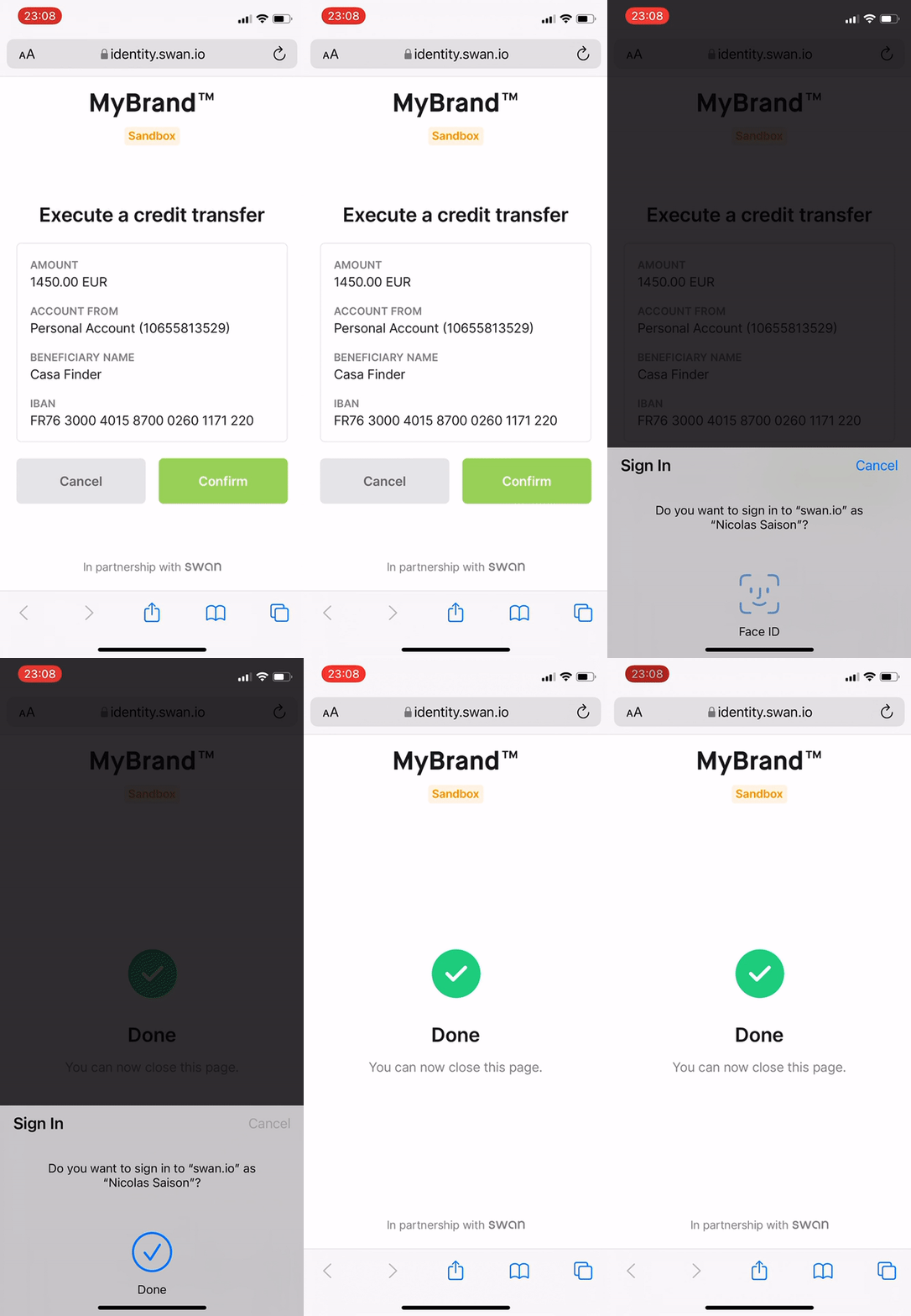
Text messages are valid for 15 minutes, and consent links time out 20 minutes after being opened.
In the consent sequence diagrams, this user experience occurs when the user opens the consent link and completes the consent request.
Look for the arrow description Uses page to consent to the operation.
Consent sequence diagrams
Diagram: Computer
If your user is on a computer, their consent flow depends on your notification settings. They'll either receive a text message from Swan (arrows 6-8) or a notification from you (arrows 9-12).
Online payments that require 3-D Secure consent guide users through a slightly different flow.
Diagram: Mobile device
If the user is on their mobile device, they don't need a computer for the consent flow.
Diagram: End-user perspective
End-user perspective of consenting to add an account membership
SCA in your mobile app
By default, when a user performs SCA in a mobile app, Swan opens the smartphone's default browser and redirects the user out of the mobile app to complete SCA. After completing SCA, the user must exit their smartphone browser and return to the mobile app.
If you have a mobile app and your users perform all their actions there, you can embed an in-app browser instead. SCA opens within your app, and after completing it, the user closes the in-app browser and stays inside your mobile app. This improves the user experience by keeping users inside your mobile app rather than redirecting them to an external browser.
This applies to both OAuth (login and authentication) and consent (sensitive operations) flows.
Follow the guide to integrate SCA to set up your in-app browser and deep link listener, then configure the sign-in and consent processes.