Audience:
Credit transfers
Move money between accounts around the world, whether in euros across the SEPA network or in multiple currencies over local rails and SWIFT.
Types of credit transfers
Swan offers two main types of credit transfers. Each type has its own rules, capabilities, and APIs.
Refer to the dedicated sections to understand each type and how they work at Swan:
| Transfer type | Description |
|---|---|
| SEPA Credit Transfers | Send and receive money using euro-based accounts and the SEPA network Includes:
|
| International Credit Transfers | Send and receive money from around the world in over 40 currencies using local payment rails and SWIFT |
Beneficiaries
Add trusted beneficiaries to accounts to facilitate credit transfers. Adding trusted beneficiaries also reduces the risk of sending a transfer to an unintended beneficiary.
You can add trusted beneficiaries with the API, either with a dedicated mutation or when initiating a credit transfer. If you use Swan's Web Banking interface, eligible account members can add trusted beneficiaries from the app. Beneficiaries who aren't added as trusted are referred to as unsaved beneficiaries.
Beneficiaries and membership permissions
How account members can interact with beneficiaries depends on their account membership permissions.
| Permission | Beneficiary interaction |
|---|---|
canViewAccount | View the list of trusted beneficiaries. |
canManageBeneficiaries | Add trusted beneficiaries. |
canInitiatePaymentswith canManageBeneficiaries | Initiate credit transfers to trusted and unsaved beneficiaries. |
canInitiatePaymentswithout canManageBeneficiaries | Initiate credit transfers to trusted beneficiaries only. |
Trusted beneficiaries move through their own status flow. Refer to trusted beneficiary statuses.
Label and reference
Add custom labels and references numbers to your SEPA and International Credit Transfers with the API, or, if you're using it, Swan's Web Banking interface.
Whether your label and reference entries are visible on other financial institutions' platforms and statements depends on their design.
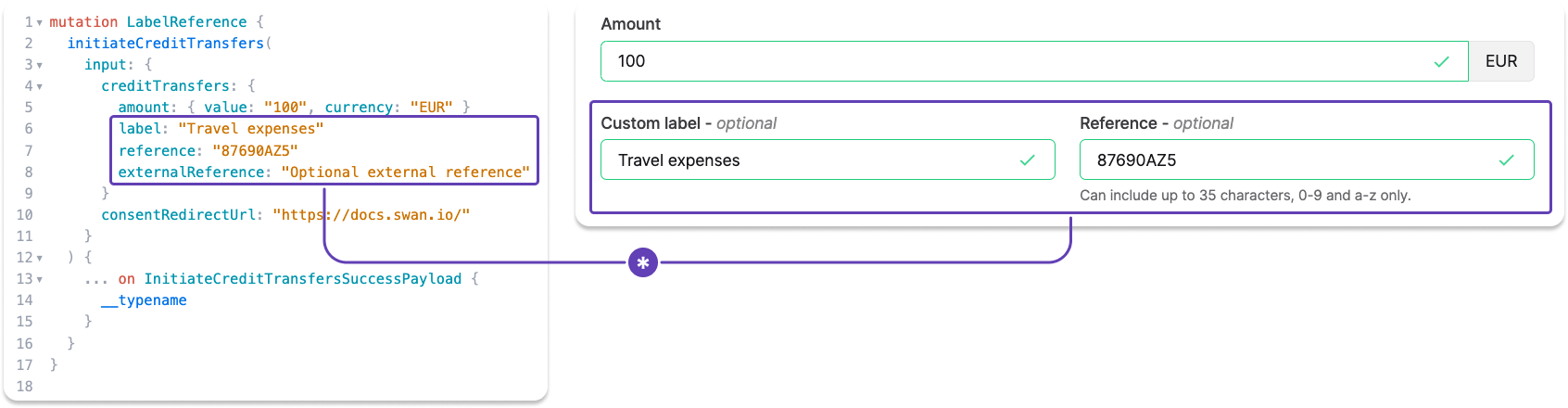
Custom label
- Optional field where you can name your transaction.
- According to SEPA, this label is for remittance information (
RemittanceInfo), or payment details. - If left empty, the default value for Web Banking is
Transfer to {beneficiary}. However, nothing is sent to the beneficiary's bank. - This value is displayed in your Swan transaction history.
- Your beneficiary probably sees this reference, though it's impossible to know because every app is different.
- Called
labelin the APItransactionobject.
Reference
- Optional field intended to provide a way for you to include a reference number or code.
- According to SEPA, this reference should be used for the end-to-end identification reference (
EndToEndId) used to uniquely identify a transaction from start to finish. - Only characters 0-9 and a-z are allowed in this field. The total number of characters allowed can change, so refer to your transfer form for the character maximum.
- If left empty, there is no default value. Note that the reference field is mandatory for SEPA inter-bank exchanges, so Swan populates an empty field with something similar to your transaction ID.
- This value will be included in the details of a transaction in your transaction history, but not displayed in the main list.
- Your beneficiary probably sees this reference, though it's impossible to know because every app is different.
- Called
referencein the APItransactionobject.
External reference
- With the API, you can also add an external reference.
- Share additional information about a transaction only visible to you.
- Called
externalReferencein the APItransactionobject.