Audience:
DevelopersOperators
Get a transaction ID
You can get transactions IDs with the API or on your Dashboard.
Dashboard
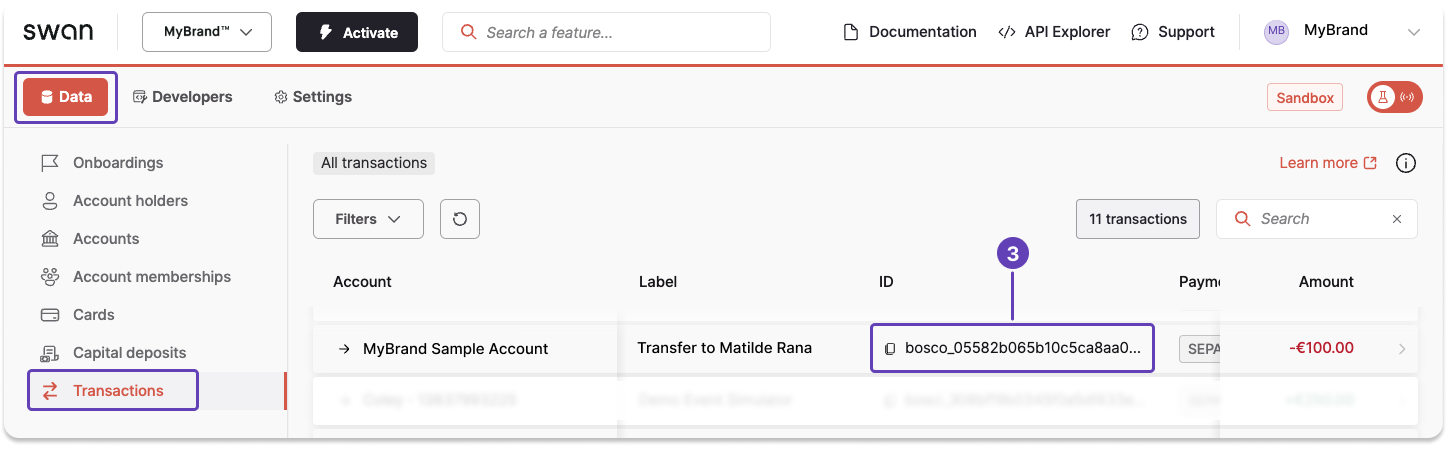
All transaction IDs for your project are on your Dashboard.
- On your Dashboard, go to Data > Transactions.
- Find the transaction you need.
- Scroll horizontally to locate the transaction ID, then click to copy.
API guide
Queries are highly customizable.
This guide focuses solely on using the transactions query to get transaction IDs.
Learn more about this query in the guide to get transaction information.
- Call the
transactionsquery. - Check the boxes for
edgesandnode. - Under
node, check the boxes forid,createdAt, andlabel.labeloften contains a name, which might be helpful.createdAtcould help you identity the payment ID you're searching for if you know when the payment was initiated.- Additionally, you might choose to get only the
first10 IDs on the list, use pagination to filter further, or add atotalCount.
Query
Open in API Explorerquery GetTransactionId {
transactions {
edges {
node {
id
createdAt
label
}
}
totalCount
}
}
Payload
{
  "data": {
    "transactions": {
      "edges": [
        {
          "node": {
            "id": "bosco_05582b065b10c5ca8aa03342bb1cf389",
            "createdAt": "2023-05-15T11:34:10.101Z",
            "label": "Transfer to Matilde Rana"
          }
        },
        {
          "node": {
            "id": "bosci_00d62797731fb95ee2f91ca32f4165e9",
            "createdAt": "2023-03-30T13:24:39.477Z",
            "label": "Transfer from Sasha Oliveira"
          }
        },
      ],
      "totalCount": 2
    }
  }
}