Audience:
Virtual IBANs
You can create multiple virtual IBANs for one account, which can be used to accept payments. Differentiate between main and virtual IBANs by their bank details: depending on the country, they use a different branch code, bank code, or IBAN type digit. Refer to local IBANs for each country's structure. Virtual IBANs can't be used to send SEPA Credit Transfers.
Working with virtual IBANs
Add virtual IBANs from your Dashboard > Data > Accounts > Virtual IBANs, or with the API.
To add virtual IBANs, the PaymentAccountType must be PaymentService and the PaymentLevel must be Unlimited.
Virtual IBANs can be canceled, but they can't be suspended.
View an account's virtual IBANs on your Dashboard > Data > Accounts > Virtual IBANs, or with the API by querying account > virtualIbanEntries.
If you use Swan's Web Banking frontend, your users can view their virtual IBANs on Account > Virtual IBANs.
Account holders can use virtual IBANs to receive SEPA Credit Transfers and to set up outgoing SEPA Direct Debit transactions.
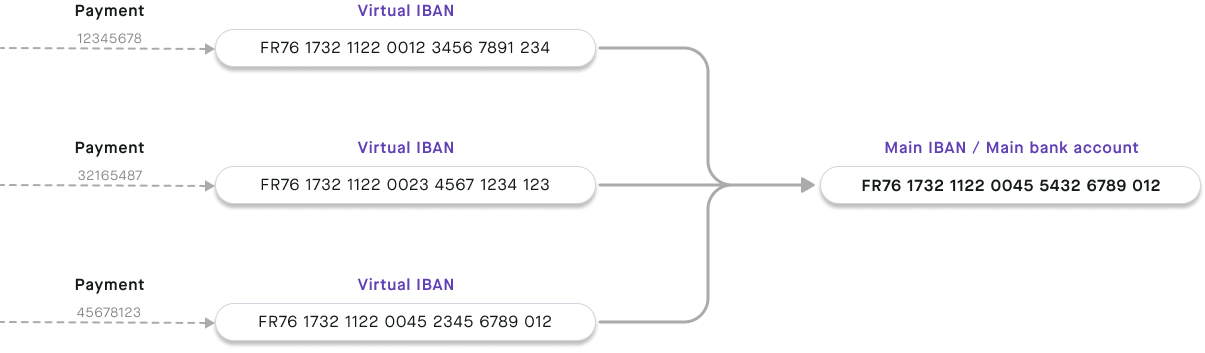
Use virtual IBANs to make paying invoices with credit transfers smoother by providing a different virtual IBAN to each client. You'll know exactly who is paying you, plus when and how much, simplifying reconciliation.